

 +86 13110089902
 bella.zhang@free-optic.com

Desktop Laser Marking Machine Recommendations
3월 23, 2026
A 데스크탑 레이저 마킹기 is one of the most popular solutions for small workshops, startups, and industrial users who need high-precision laser marking in a compact space. With a smaller footprint and lower investment cost, desktop laser engravers deliver excellent performance for metal engraving, plastic marking, and product customization.
In this guide, we’ll recommend different types of desktop laser marking machines based on user needs and applications.
Why Choose a Desktop Laser Marking Machine?
Desktop laser marking machines are widely used because they offer:
- Compact design for limited workspace
- High precision and stable performance
- Low maintenance and no consumables
- Easy operation and quick setup
- Ideal for small batch production and customized engraving
They are commonly used for marking logos, serial numbers, QR codes, barcodes, and graphics on metal and plastic parts.
Recommended Types of Desktop Laser Marking Machines
- Standard Desktop Fiber Laser Marking Machine (20W–200W)
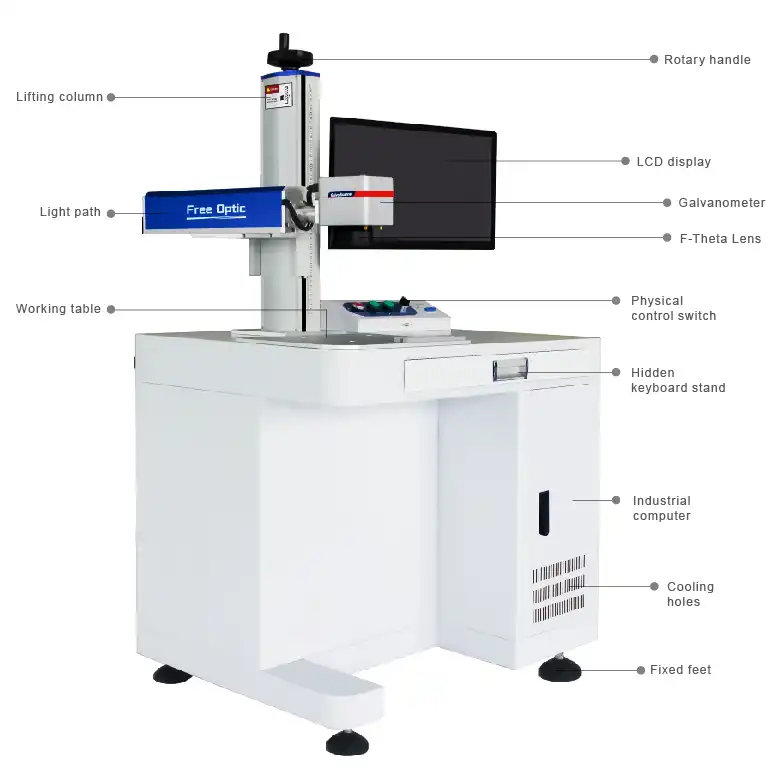
This is the most widely used type for industrial applications.
Recommended for:
- Metal engraving (stainless steel, aluminum, brass, copper)
- Industrial traceability marking
- Hardware, tools, and automotive parts
Key features:
- High-speed marking up to 9000–10000 mm/s
- Long service life (up to 100,000 hours)
- Compact and cost-effective design
- Suitable for continuous operation
This is the best choice for factories and professional users.
- Compact Portable Desktop Laser Engraver

Portable desktop models are designed for flexibility and mobility.
Recommended for:
- On-site marking
- Small workshops and service providers
- Jewelry, gifts, and personalized products
Key features:
- Lightweight and space-saving design
- Easy transport and installation
- Fast setup and user-friendly operation
Ideal for mobile businesses and customized services.
- All-in-One Enclosed Desktop Laser Marking Machine
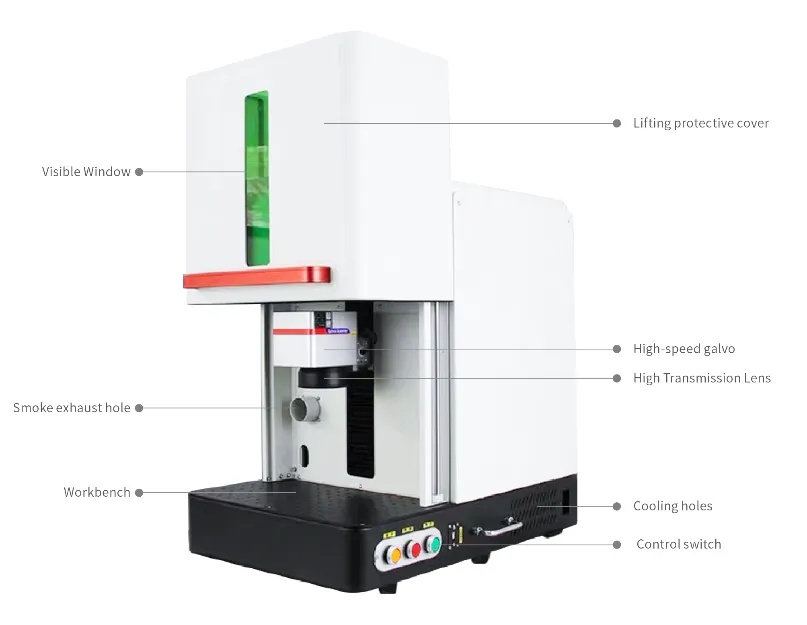
Enclosed desktop systems provide enhanced safety and ease of use.
Recommended for:
- Laboratories and educational environments
- Clean production environments
- Beginners or non-technical users
Key features:
- Fully enclosed design for safety
- User-friendly interface
- Requires minimal installation space (as little as a small desktop area)
Best for safe, clean, and professional working environments.
How to Choose the Right Desktop Laser Marking Machine
When selecting a desktop laser engraver, consider:
✔ Material Type
- Metal → Fiber laser
- Non-metal → CO₂ laser
- Heat-sensitive → UV laser
| Desktop Laser Marking Machine Comparison Table | |||
| Feature / Type | Fiber Laser Desktop | CO₂ Laser Desktop | UV Laser Desktop |
| Best Materials | Metals, some rigid plastics | Wood, acrylic, leather, paper and etc | Plastics, glass, ceramic, 3C products and etc. |
| Laser Wavelength | 1064 nm | 10,600 nm | 355 nm |
| Marking Quality | High contrast on metals | Good on non-metal materials | Ultra-fine, high precision |
| Heat Impact | Medium | High | Very low (cold marking) |
| Engraving Depth | Excellent (deep engraving) | Good (non-metals) | Light but precise |
| Speed | Very fast | Moderate–fast | Fast with high accuracy |
| Maintenance | Very low | Medium | Medium |
| Typical Power | 20W–200W | 40W, 60W as normal | 5W–20W |
| Application Industry | Automotive, electronics, hardware | Crafts, signage, packaging | Medical, 3C products |
✔ Power Requirement (fiber laser machine as example)
- 20W-30W → Basic marking
- 50W–200W → Deeper engraving and faster production, or high-reflective material marking
✔ Workspace Size ( available at fiber laser, Co2 laser, UV laser)
- Small parts → 110×110 mm lens
- Larger parts → 150×150 mm, 175x175mm or more
✔ Application Scenario
- Industrial production → Standard desktop fiber laser
- Custom products → Portable or hybrid system
- Lab or office → Enclosed system
Finally
The best 데스크탑 레이저 마킹기 depends on your specific needs:
- Choose a standard fiber laser desktop machine for industrial metal marking
- Choose a portable model for flexibility and mobility
- Choose an enclosed system for safety and ease of use
- Choose a dual-laser system for multi-material applications
A well-selected desktop laser engraver can significantly improve your production efficiency, marking quality, and business flexibility.
If there is any confused, just 문의하기 freely!